mail@hostmargin.com
 🔥 Free .COM Domain with any Shared Hosting Annual Plan! 🚀




Introducing LaunchPad: Static Site Hosting from Git
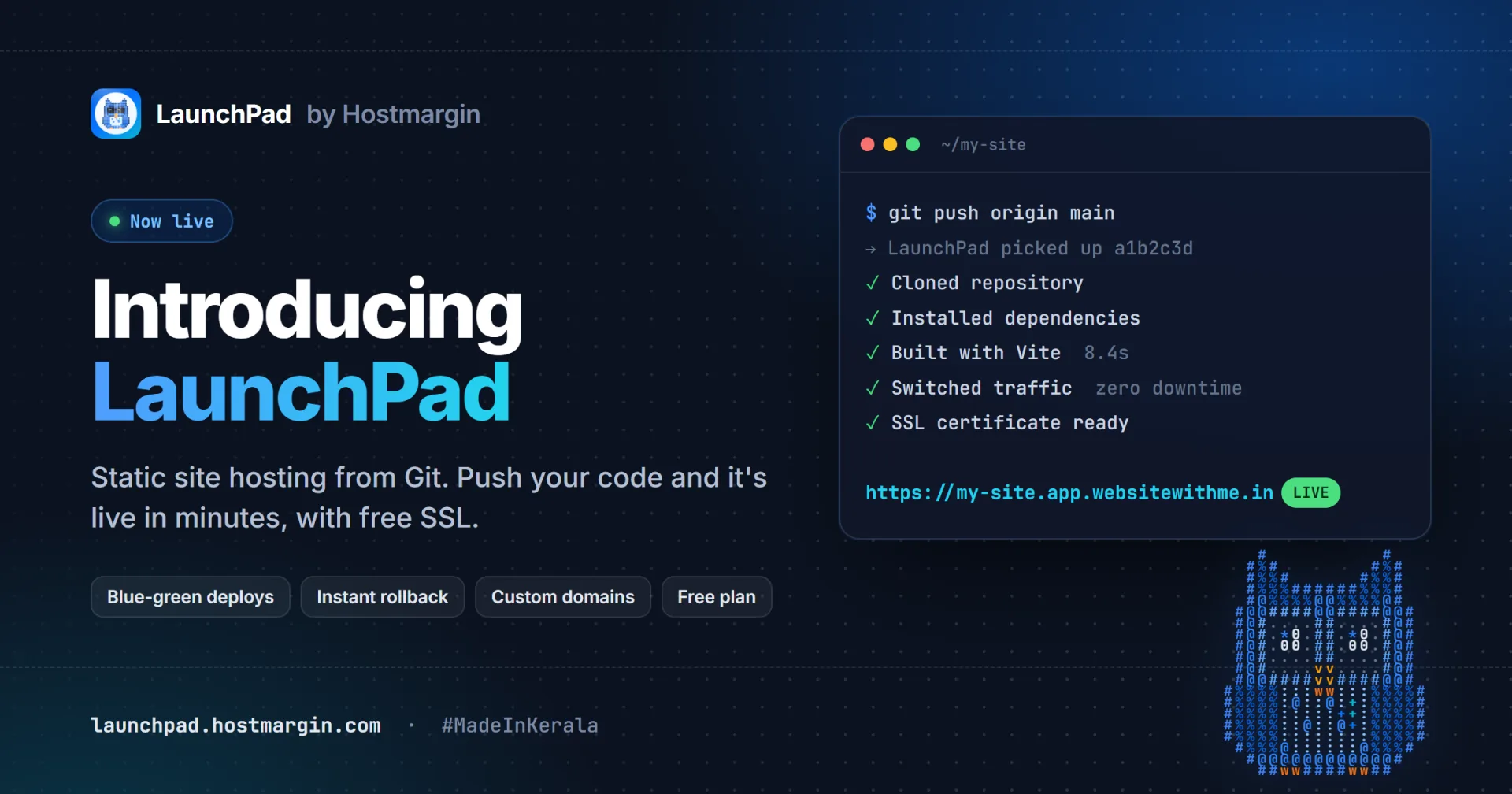
Push to GitHub or GitLab and your site is live in minutes, with free SSL, custom domains and one-click rollback. Free to start.
Today we're launching LaunchPad, static site hosting from Hostmargin, built in India for developers everywhere. Connect a GitHub or GitLab repository, push your code, and LaunchPad builds it and puts it live on a free SSL subdomain within a minute or two. No servers to set up, no FTP, no deploy scripts.
If you build with React, Vue, Angular, Astro, Svelte, Hugo, Vite or plain HTML, LaunchPad is made for you. It's free to start, with paid plans from ₹499 a month when your projects grow.
Why we built LaunchPad
For years our customers have hosted WordPress sites, business websites and email with Hostmargin. More and more of them also run modern front-end projects: a React dashboard, a product landing page, a portfolio in Astro, documentation in Hugo. These sites don't need a full hosting account. They need a fast way to go from git push to a live URL.
The popular tools for this are built abroad, priced in dollars and billed on international cards. LaunchPad gives you the same workflow with pricing in rupees, billing through your existing Hostmargin account, and support from a team that answers in your time zone.
How it works
- Connect your repository. Sign in with your Hostmargin account, pick a GitHub or GitLab repository and choose a branch. Private repositories work too, through a read-only deploy key.
- LaunchPad detects your framework. It suggests the right build command and output folder for React, Vue, Angular, Astro, Next.js static export, Hugo and more. You can change them at any time.
- Push to deploy. Every push to your branch triggers a new build. You can follow it step by step, from cloning to install to build to going live, with the full build log.
- Your site is live. It gets its own free subdomain with SSL straight away. Add your own domain whenever you're ready.
No Git? Upload a ZIP of your built site and it goes live the same way.
Built for safe, fast releases
Zero-downtime, blue-green deploys
Each deploy is built in its own release folder while the current version keeps serving visitors. Only when the new build has finished successfully does LaunchPad switch traffic over, in one step. Visitors never see a half-uploaded site, and a failed build never takes your site down.
Instant rollback
Shipped a bug? Roll back to any previous successful deployment with one click. The old release is still on the server, so the switch takes seconds and needs no rebuild.
Isolated builds
Every build runs in its own Docker container with fixed CPU, memory and time limits. Your build can't affect anyone else's, and nobody else's can affect yours.
Everything else you'd expect
- Custom domains with free SSL. Point your domain at LaunchPad, and we verify the DNS and issue the certificate automatically.
- Team access. Invite teammates as editors or viewers on the Pro and Business plans.
- Password protection. Share a work-in-progress site with a client behind a username and password.
- Maintenance mode. Take a site offline with a custom message while you fix something.
- Scheduled deploys. Set a release to go live at a time you choose, such as a launch at 9 AM.
- Deploy from your editor. The LaunchPad extension for VS Code and Antigravity lets you deploy without leaving your code. Search for LaunchPad by Hostmargin in the extensions marketplace.
- Agent Hoot. Our owl guide walks you through your first deploy and explains each part of the dashboard.
Plans and pricing
| Free | Pro | Business | |
|---|---|---|---|
| Price | ₹0 | ₹499 / month | ₹1,499 / month |
| Projects | 3 | 10 | Unlimited |
| Deploys per month | 50 | 500 | Unlimited |
| Bandwidth per month | 5 GB | 50 GB | 200 GB |
| Build minutes per month | 100 | 500 | 2,000 |
| Custom domains | 1 | 5 | Unlimited |
| Team members | 1 | 3 | 10 |
Start on Free and upgrade from your dashboard when you need more. See the full comparison on the LaunchPad compare page.
Who LaunchPad is for
- Freelancers and agencies who build landing pages and portfolios for clients and want a live link on every push.
- Startups that want their marketing site and docs off their app servers.
- Students and hobbyists putting projects online for free, with a real URL and SSL.
- Existing Hostmargin customers who want front-end projects next to their Hostmargin hosting, on one bill and one account.
#MadeInKerala
LaunchPad is designed, built and run by our team in Kerala, part of BI Enterprises. It's one of the products we tag #MadeInKerala, our campaign to show what Kerala builds in technology. If you're building something in Kerala too, we'd love to feature it.
Get started
Your first deploy takes about two minutes:
- Go to launchpad.hostmargin.com and sign in with your Hostmargin account. New here? Creating an account is free.
- Click New project and connect a repository, or upload a ZIP.
- Click Deploy.
Questions about build commands, domains or limits? The LaunchPad docs and FAQ cover the common ones, and our support team is a ticket away.
Push your code. We'll handle the rest.